Rehearsal Page
Your group’s own private page for practising the songs at home
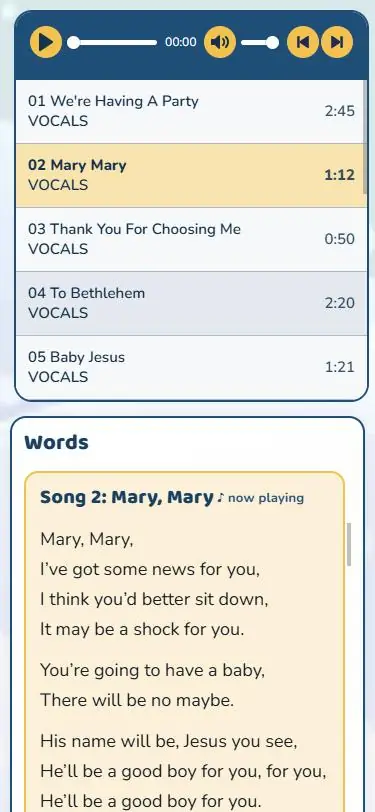
A ‘Rehearsal Page’ is a secure, private web space for the children in your production, so they can practise the songs at home with their families.
It has the songs from your publication: vocal and backing tracks, lyric videos (where the publication has them), and all the song words to sing along with. You share one web address and one password, and that’s it.
Try it FREE for 24 hours!
Already own the Digital Publication? Start a free 24-hour trial from your ‘Digital Publication’ page and see your own Rehearsal Page exactly as families will, with your own songs, before you buy. The 24 hours start when it’s first opened.
Why use a Rehearsal Page?
Learn the songs faster
They can listen and sing along at home as often as they like, so they come to rehearsals more confident.
Easy for every family
It works on any phone, tablet or computer. There’s nothing to download or install, no account to create, and each device remembers the password for 30 days.
Your login stays private
Families only get the Rehearsal Page – never your account details, your downloads or your order history.
Parents’ letter, ready to go!
Print it, or copy it into your newsletter or email. It includes the page address, password, QR code and simple instructions.
Safe for families
No adverts, no tracking and no personal details are ever asked for. Your organisation gets its own unique, secure page, hidden from search engines.
Annual usage
Your Rehearsal Page lasts as long as your annual licence does for the associated publication.
Why not just share your own login details?
Your personal Learn2soar Music login opens everything in your account: all your personal details, billing details, your downloads, preferences and order history. Our user licence allows you to share that login only with trusted colleagues who are helping with your production – not with children or families.
A Rehearsal Page gives families exactly what they need to practise, and nothing more:
- Streaming only – the songs can’t be downloaded
- One simple password, just for this page
- Your personal account, files and details stay private
- If the password ever spreads too far, we can change it for you
How it works
Step 1 Choose your group size
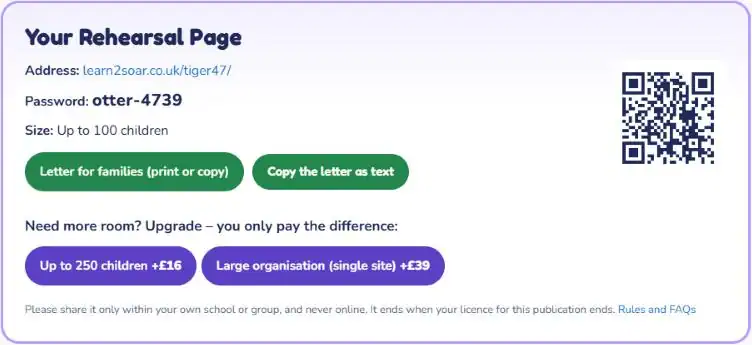
On the publication’s page, find the Rehearsal Page in the ‘Choose Your Pack’ section and choose your group size. Add it to your basket with the Digital Publication or Complete Pack – or add it later from your ‘Digital Publication’ page.
Not sure yet? Try it FREE for 24 hours first – start your free trial from your ‘Digital Publication’ page.
Step 2 Page address and password
As soon as your order is complete, we email you the Rehearsal Page address and password. They’re also on your ‘Digital Publication’ page whenever you need them.
IMPORTANT: Your unique Rehearsal Page only starts to work after you’ve first accessed the associated ‘Digital Publication’. This is so that you can agree to and accept the terms of use.
Step 3 Tell the families
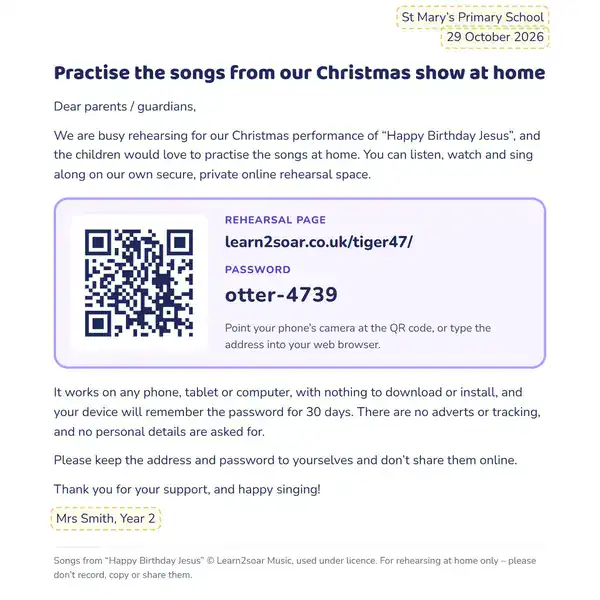
Use the ready-made letter template: add your school or group name, then print it or copy it into an email or newsletter. It has the address, the password and a QR code.
Step 4 Practise at home
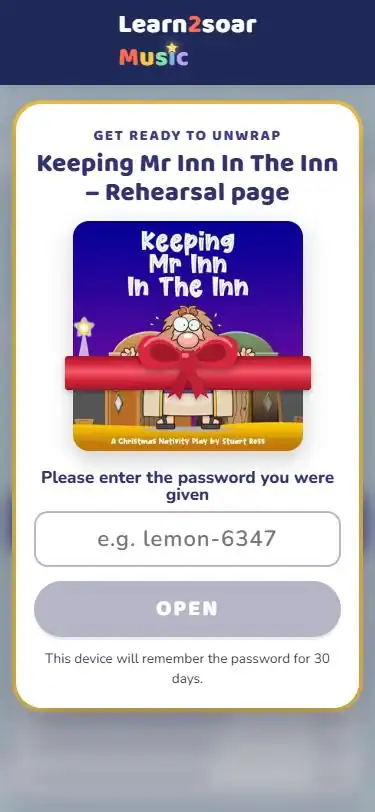
Families open the page and type the password. Then the children can listen, watch and sing along – as often as they like.
Passwords only need to be re-entered after 30 days, or if swapping browsers or devices.
The rules, in plain English
- Access to your Rehearsal Page is only enabled after you have first opened the associated ‘Digital Publication’. This is so that you can formally tick to agree to the terms of use.
- Share the address and password only with the children taking part in your production, and their families.
- Keep it within your own school or group. Never post the address or password online or on social media, or pass them to another school. (The ‘Large organisation’ size covers one site only.)
- It’s for practising at home: the songs can be played, but not downloaded, recorded, copied or played in public.
- Choose the size that matches the number of children. If more children join, upgrade at any time for the difference in price.
- Devices used by children and families don’t count towards your own user licence’s device limit.
- Access to your Rehearsal Page ends when your licence for the publication ends.
- To protect our songs, we count how many times the password is entered – nothing else. If use is much higher than your size would explain, we may contact you, change the password, ask you to upgrade, or pause the page.
The full terms are in our Licensing Agreement.
Prices
One price per publication, for as long as your licence lasts.
How to buy
Visit any of the above product pages, then scroll to the ‘Choose Your Pack’ section, and then choose one of the ‘Rehearsal Page’ options.
You must also buy (or have already bought) the associated Digital Publication (or Complete Pack where available).
Already have the publication? You can buy access to a Rehearsal Page from your ‘Digital Publication’ page at any time.
Questions and answers
How does the free trial work?
If you already own the Digital Publication, you can start one free 24-hour trial from your ‘Digital Publication’ page. You get your own Rehearsal Page address and password straight away, so you can see exactly what families will see, with your own songs.
The 24 hours start the first time the password is entered, and the trial works on up to 6 devices. The letter for families becomes available once you’ve bought your Rehearsal Page. There’s one free trial per customer.
What happens when the free trial ends?
The page closes, and anyone opening it will see that the free trial has ended. If you’d like to keep it, just choose your group size on your ‘Digital Publication’ page at any time. The address and password you’ve already tested carry straight on, so nothing is lost.
Do families need to create an account or log in?
No. They just open the secure page address and type the password. There’s nothing for families to sign up for, and their personal details are never asked for or stored in any way.
How can you tell if we go over our limits?
We do not track or store direct usage, but we do count the number of times your page’s unique password is entered. We are happy to be flexible though. We know that families will often use a few devices to access content. So for example, if you have purchased access for up to 40 children, we will generally allow around 100 passwords entered across all devices. However, if there are considerably more than that, or if there are sudden spikes of unusual activity, then we will contact you. We may then change your page address and password and ask you to consider upgrading your usage to the next size.
Which devices does it work on?
Any phone, tablet or computer with an up-to-date web browser and a working internet connection. There’s nothing to download or install.
Can families download the songs?
No. The songs are streamed for practising at home only, so they can be played but not downloaded.
Which size should I choose?
Choose the size that covers the number of children taking part in your production. ‘Large organisation’ is for bigger groups on a single site.
What if more children join later?
You can upgrade to a larger size at any time from your ‘Digital Publication’ page, and you only pay the difference. The address and password stay the same.
How long does the Rehearsal Page last?
Your access ends when your annual licence for the publication ends. You can renew for the following year or years at any time. Your organisation’s unique page address and password will be reset at that point.
Is it safe for children to use?
Absolutely. There are no adverts and no tracking, and none of your families’ personal details are ever asked for or stored in any way. The page uses one essential cookie to remember the password on that device for 30 days, and it’s hidden from search engines.
What if the password is shared too widely?
Contact us and we can change it. The new password will show on your ‘Digital Publication’ page, ready to pass on to your families.
Do families’ devices count towards my licence?
No. Devices used by children and families to open the Rehearsal Page don’t count towards the device limit of your own licence.
I’ve already bought the publication. Can I still get a Rehearsal Page?
Yes. Open your ‘Digital Publication’ page and you’ll find the Rehearsal Page there, ready to add.
Still have a question? We’re happy to help.